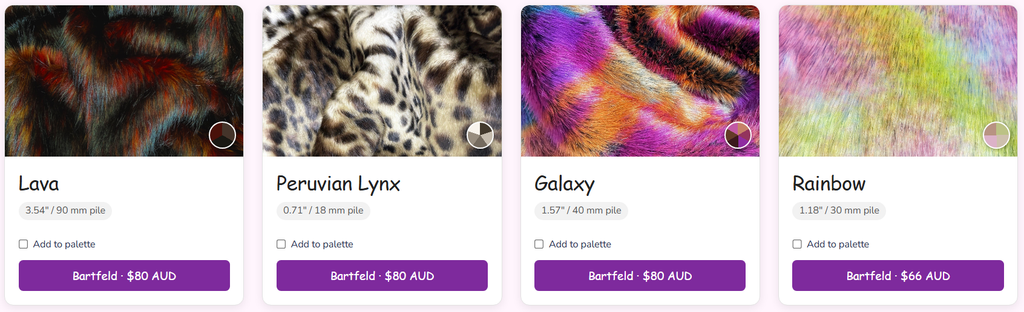
I’ve bee putting in some work the last few weeks, and this thing is getting pretty nifty now. Also, wow, my UI doesn’t want to make me vomit anymore.
Functional & Major Changes
Palette builder
- “Add to Palette” checkbox on each card feeds a sticky, scrollable bottom tray showing swatch + name + hex for each saved color.
- Export palettes as an image or as text.
- On multi-color furs, clicking a single pie wedge adds just that color, while “Add to Palette” grabs all colors at once.
Color matching & multi-tone furs
- Switched color-distance matching from redmean RGB to CIEDE2000 (Lab-space), which is much more perceptually accurate.
- Added support for two-tone (diagonal split swatches) and rainbow/multi-color furs (rendered as pie-wedge swatches).
- New Tones for new furs, Multi-Colored, Spotted, Striped, and Animal Print.
Multi-vendor support
- Same fur sold by multiple retailers now merges into a single card showing every seller and price, sorted by best deal.
- “Starting at $X” and price filtering convert all listings to USD-equivalent and use the cheapest, while displayed prices still follow the currency toggle.
- A fur group is only marked “discontinued” if every vendor for it is discontinued — otherwise dropped vendors just quietly disappear from “Available From” and filters.
Filtering logic
- Weight filtering simplified to Light/Medium/Heavy classes instead of exact gram values (old raw Weight (g) filter removed).
- Pile Length now supports selecting multiple ranges at once instead of just one.
Multi-currency
- Live conversion and auto-sync across USD/yd, CAD/m, EUR/m, AUD/m, GBP/yd, and GBP/m using the Frankfurter API.
More Vendors
- Added CosmicFur, eFutro, Gummyshark, Hopen, Linda Wholesale, and NeoTrims.
UI/UX
- Collapsible “How to Use” box, now including sections on the palette builder and multi-color furs
- ‘More Filters’ option, 7 filters have been moved to under this dropdown.
- Width filter is now a smooth slider.
- Renamed “Main Color Family” → “Main Color” and “Secondary Color Family” → “Secondary Colors”
- Added a red “x” to clear individual filters, and renamed “Clear Filters” to “Clear All Filters”
- Vendor link buttons are color-coded and show price + vendor name directly on the button
- Next/prev page buttons now scroll back to top of results
- Yd Width (in) changed to Width
Minor Polishes
- Pagination and result counts now operate on merged vendor groups rather than raw database rows
- Cards per page reduced from 60 to 20
- The number of furs found is the actual number of distinct furs, not just furs totals.
Leave a Reply